Giving Season is the biggest and busiest fundraising period for most charitable organizations. However, many charities leave money and opportunities on the table because they lack the right digital tools and record-keeping processes to make the most of this prime fundraising time.
There are several ways CanadaHelps’ digital tools make Giving Season easier. They help you view past results, set clear goals, and track and share live fundraising progress. This allows you to improve your fundraising programs, raise more, and grow your impact as the Giving Season approaches.
Keep reading as we first explore the two most common fundraising mistakes, and how to use the goal-setting tool and year-over-year performance in your CanadaHelps dashboard to strengthen your year-end results.
Don’t make these two Giving Season fundraising mistakes:
Charities often make these two essential (but easily correctable!) mistakes during the year-end fundraising campaign season:
1. Not tracking and analyzing fundraising data
Without systems to gather and review fundraising metrics (such as how much was raised and which days brought in the most dollars) charities are unable to learn from the previous year’s results.
2. Not taking the time to set annual fundraising goals
Successful fundraising organizations review last year’s fundraising results and use that information to inform goals around what they expect to raise in the current year.
More preparedness is the answer. Proactively establishing the right tools to collect data and set goals can make or break your annual Giving Season campaign.
How Can CanadaHelps Year-over-Year Metrics Dashboard Strengthen Giving Season Fundraising?
1. Snapshot Your Fundraising Performance
Charities that run successful Giving Season campaigns continue to do so because they review the performance of past campaigns, look back at the year-over-year performance, and pull out insights and takeaways..
CanadaHelps’ Year-over-Year (YOY) metrics dashboard provides charities like yours with a simple snapshot and summary of your performance to benchmark your next fundraising campaign. You can see your year-over-year total donations, funds raised, and donor base changes to paint a clearer picture of your organization’s growth at a glance.
What is Year-over-Year (YOY) growth?
YOY growth means measuring the change of a specific metric, such as donation amounts, from one year against the same time period in a previous year. This data is typically used to measure whether your organization is growing, holding steady, or declining to understand which fundraising efforts are driving those changes.
Tracking YOY performance will help you identify fundraising trends and benchmark realistic goals to plan and achieve long-term fundraising success.
2. Identifying Fundraising Trends
The YOY metrics in your CanadaHelps dashboard make it easy to see how your fundraising performance is changing over time–no need for clunky spreadsheets or formulas. In the dashboard, you’ll be able to compare YOY:
- Total funds raised;
- Total number of donations; and
- The total number of donors, including monthly donors
Look for changes such as an uptick in donations after an email push, steady growth during campaigns, or a lull in funds over a long weekend. Ask yourself what do these trends mean – for example, are there key times or dates to increase momentum, or slow dates and times to avoid? What communication channels trigger an increase in donations?
If you see stagnation in your total number of donations, but identify an increase in total funds raised, that could indicate larger individual gifts, or an increase in high-value donors, rather than general donor growth.
Conversely, growth in the number of donors but lower total funds raised may indicate smaller gift sizes or an increase in first-time donors.
If you see changes, don’t panic! Data points in the dashboard are simply indicators for where and how you may need to adjust your fundraising strategy to have a successful Giving Season.
This high-level view of donation data offers valuable insights that help you understand whether your donor base is expanding, if average gift sizes are shifting, trends in your overall fundraising health, and guide your strategy for even stronger results, year after year.
How Can CanadaHelps’ Goal-Setting Tool Strengthen Your Annual Fundraising Campaigns?
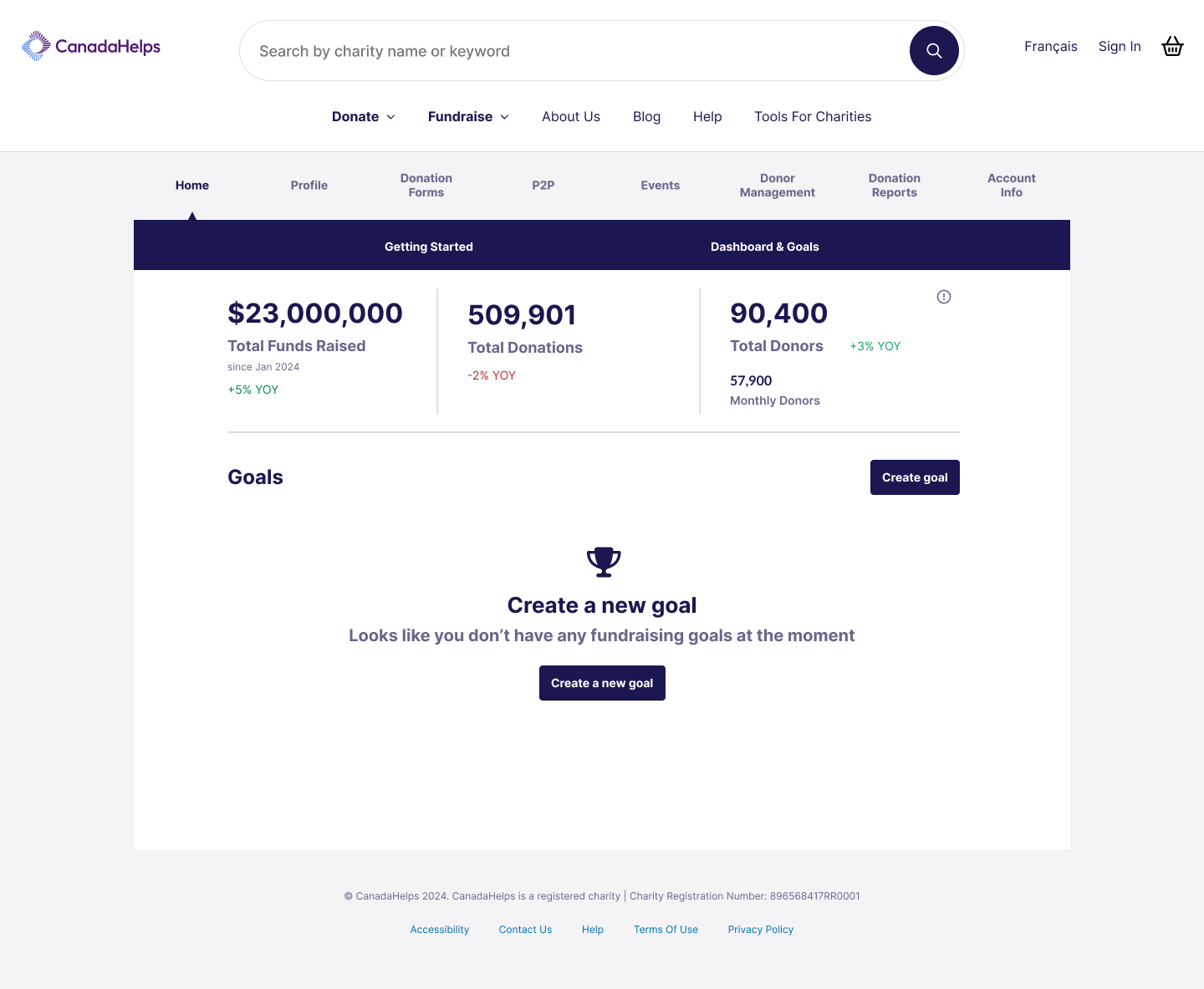 Login to your CanadaHelps account, and on the Home Page, navigate down to the Goals Section to create a new goal.
1. Stay organized
As the saying goes: without a goal, you can’t score. It’s an old saying, but it still rings true in charitable fundraising because goals keep you organized and on track.
Charities that use CanadaHelps’ goal-setting tool are more likely to achieve their fundraising targets; in fact, 60% of charities that set a goal ended up reaching it last year.
How much should we aim to raise this Giving Season?
It’s a question charities contemplate each time the Giving Season rolls around. By setting fundraising goals, you benchmark fundraising results. An easy way to benchmark is to use CanadaHelps Giving Season Report to quickly get fundraising results from last November and December, then aim 5-15% higher this Giving Season to challenge your charity to grow.
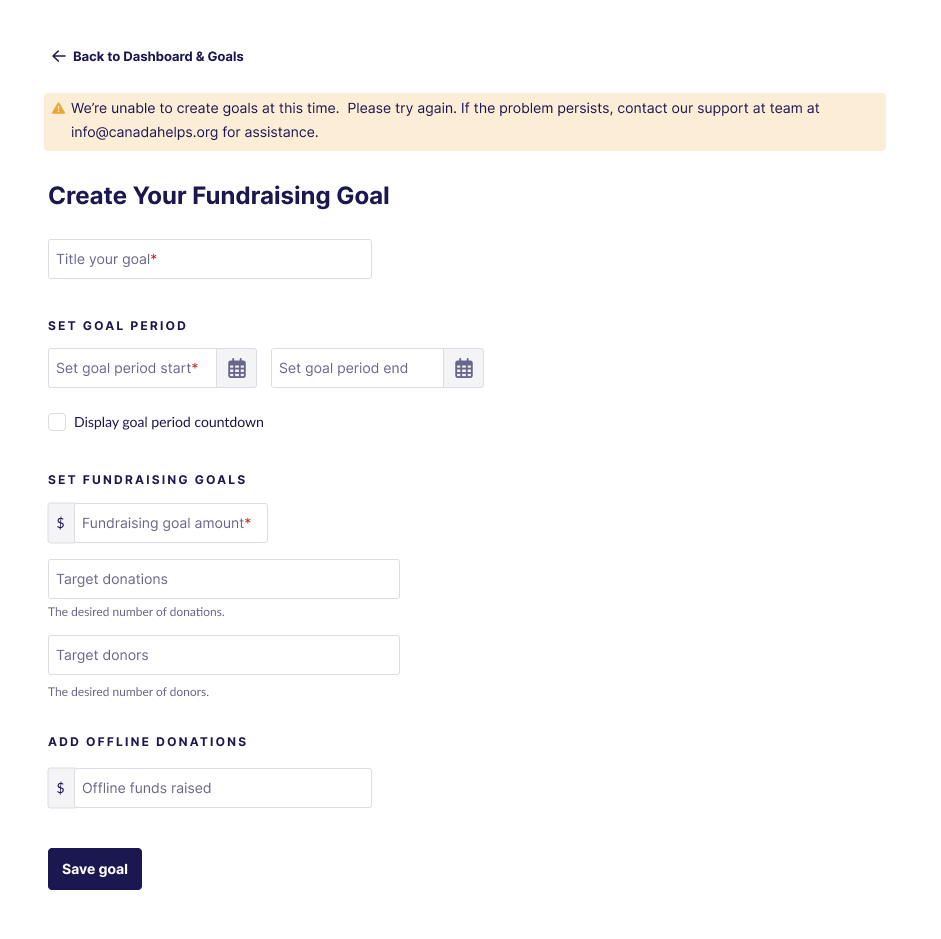 Enter your campaign title, goal-specific date range, fundraising donor and donation targets, and any offline donations you may have received (mailed cheques, cash and/or e-transfers etc).
2. Measure Progress
In your CanadaHelps account, you can measure and track the progress and success of your fundraising campaign by activating the live donation tracking thermometer within the goal-setting tool feature for your year-end fundraising campaign.
Measuring progress with your fundraising thermometer will help you:
- View your progress
- Stay results-driven
- Measure KPIs at a glance
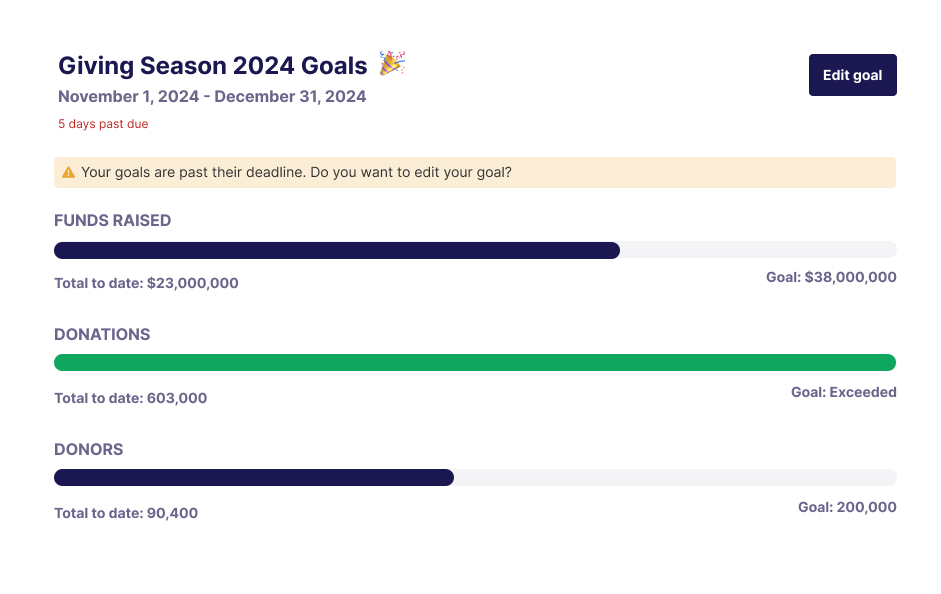 How giving season goal data is tracked and displayed in your CanadaHelps account
3. Share results and celebrate wins
One way successful fundraisers engage donors, build trust and raise more is by sharing fundraising results and celebrating the milestones and outcomes they achieve with their audience. Think back to when you have watched campaign results trickle in. The suspense of wondering whether your goal will be reached creates tension, urgency and camaraderie.
By using the CanadaHelps goal-setting tool, you can easily screenshot your progress bar and share it with your donors to drive momentum and increase giving.
Remember: Donors can’t see progress on your bar – you will need to screenshot and share progress with them!
By sharing how close you are to achieving your campaign goals, it will help build trust, create transparency, and encourage further engagement from your donors.
Bonus: show fundraising progress in real-time with Custom Donation Forms
For charities that want to go the extra mile, you can also set a fundraising goal in your Custom Donation Form using the fundraising thermometer feature. This way, supporters can see your fundraising progress in real time, giving them a clear view of how your campaign is progressing and inspiring them to reach your goal.
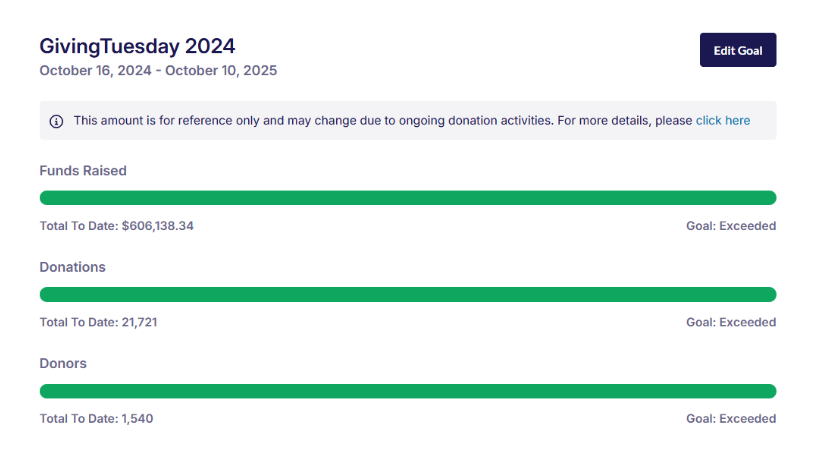 The success page above showcases fundraising results and highlights donation wins.
Next Steps
As the Giving Season approaches, utilizing CanadaHelps’ YoY performance dashboard and goal-setting tool will put your charity in the best position to achieve your end-of-year fundraising targets – whether your charity’s goal is increasing the amount of funds raised or upping the number of donations and/or donors.
Through harnessing these two online tools, your charity will be in the best place to generate fundraising wins and exceed revenue expectations! Get started today.